Can you Add Schema to Pages on Squarespace? (Full Tutorial)
Schema markup is becoming increasingly important for SEO, especially if you want your website to perform well in AI-powered search engines like ChatGPT, Claude, Gemini, and Perplexity.
These platforms rely heavily on structured data to understand website content. By adding Schema markup to your Squarespace website, you make it easier for search engines and AI tools to interpret, categorize, and potentially rank your pages more effectively.
The good news? You absolutely can add Schema markup to Squarespace.
In this guide, you’ll learn:
What Schema markup is
Why it matters for SEO and AI visibility
How to generate Schema markup
How to add Schema to Squarespace step-by-step
What Is Schema Markup?
Schema markup (also called structured data) is a type of code that helps search engines understand your content more clearly.
It provides extra context about your:
Business
Services
Articles
Products
FAQs
Reviews
Locations
Website pages
Most Schema is written in JSON-LD format, which is the preferred format used by major search engines.
Start, scale & systemise your web design agency.
I bootstrapped my agency from zero to seven figures. The Margin is the operating system I wish I'd had.
Join The Margin


Need an expert to build your Squarespace website?
Book a free kick-off call with our team to discuss your project requirements in detail.
Why Schema Matters for SEO and AI Search
Modern AI systems and search engines love structured data because it simplifies content interpretation.
Adding Schema markup can help:
Improve search engine understanding
Increase eligibility for rich search results
Strengthen topical relevance
Enhance local SEO
Improve visibility in AI-generated answers
Help LLMs better categorize your website
As AI-driven search continues to evolve, structured data is becoming an increasingly valuable part of technical SEO.
Can You Add Schema to Squarespace?
Yes, despite some confusion online, Squarespace fully supports Schema markup.
One of the easiest ways to add Schema to a Squarespace page is by using a Code Block.
The code itself won’t be visible to website visitors, but search engines and AI crawlers will still be able to read it.
How to Generate Schema Markup
Before adding Schema to Squarespace, you first need to generate the code.
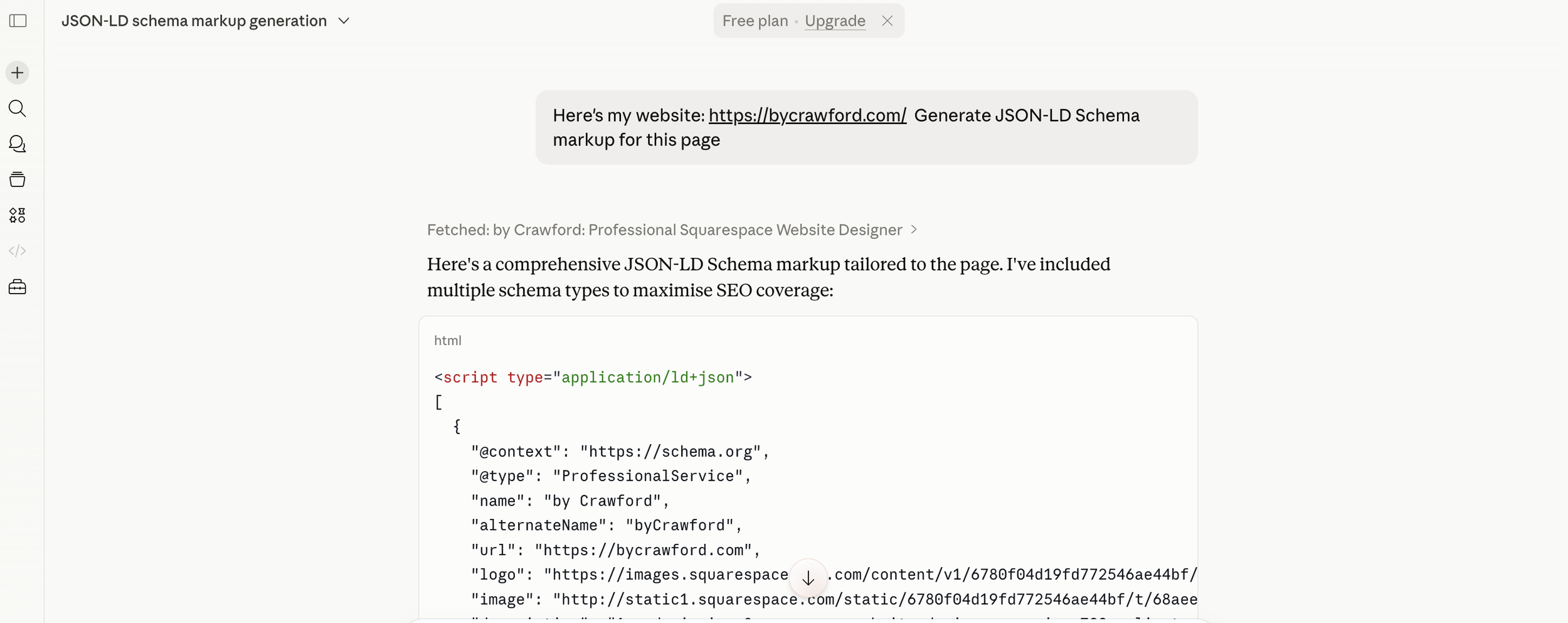
Option 1: Use Claude to Generate Schema
A quick and easy method is using Claude.
You can simply prompt it with something like:
“Here’s my website. Generate JSON-LD Schema markup for this page.”
Claude can generate a solid Schema foundation for:
Local businesses
Service pages
Blog posts
Organizations
FAQs
Articles
Option 2: Use an Online Schema Generator
If you prefer not to use AI tools, you can also use dedicated Schema generators online.
Popular options include:
Google Structured Data Markup Helper
Merkle Schema Generator
TechnicalSEO Schema Generator
These tools allow you to create valid JSON-LD markup without coding knowledge.
How to Add Schema Markup to Squarespace
Once you have your JSON-LD Schema code ready, follow these steps.
Step 1: Open the Page You Want to Optimize
In Squarespace:
Navigate to the page where you want to add Schema
Click Edit
You can add Schema to:
Homepage
Service pages
Blog posts
Landing pages
Contact pages
Step 2: Add a Code Block
Inside the page editor:
Click Add Block
Search for Code
Insert a Code Block onto the page
Many people place it near the bottom of the page for organization purposes.

Step 3: Paste Your Schema Code
Inside the Code Block:
Delete any placeholder text
Paste your JSON-LD Schema markup
Step 4: Save and Publish
Once pasted:
Click Save
Exit the editor
Publish or update the page
The Schema code will not appear visibly on the page for visitors, but it will still be active in the page source for search engines and AI crawlers.
Best Types of Schema for Squarespace Websites
Depending on your site, useful Schema types may include:
LocalBusiness
Organization
Service
Article
BlogPosting
FAQPage
Product
Review
BreadcrumbList
Choosing the correct Schema type helps search engines better understand your content and business structure.
Final Thoughts
Adding Schema markup to Squarespace is one of the simplest technical SEO improvements you can make.
As AI-powered search engines like ChatGPT, Claude, Gemini, and Perplexity continue evolving, structured data is becoming increasingly valuable for visibility and discoverability.
By generating JSON-LD Schema and placing it inside a Squarespace Code Block, you can help search engines and AI systems better understand your website content, potentially improving rankings, indexing, and search appearance over time.
If you’re serious about SEO, Schema markup should absolutely be part of your Squarespace optimization strategy.