How to Enable and Customize Cookie Banner on Squarespace
If you've ever browsed a website and been greeted by a cookie consent popup, you're not alone in finding them a little frustrating. While cookie banners can feel intrusive, they're a legal requirement in many countries to help websites comply with privacy regulations such as GDPR and other data protection laws.
Squarespace recently updated its cookie management system, making it easier than ever to enable and customize cookie consent banners on your website. In this guide, we'll walk you through how to turn on your Squarespace cookie banner and style it to match your site's design.
Why You Need a Cookie Banner on Your Squarespace Website
Cookie consent banners help inform visitors about how your website collects and uses data. Depending on your audience and location, displaying a cookie banner may be required by law.
By enabling Squarespace's built-in cookie banner, you can:
Improve compliance with privacy regulations
Give visitors control over their cookie preferences
Build trust and transparency with your audience
Manage cookie consent without third-party plugins
Start, scale & systemise your web design agency.
I bootstrapped my agency from zero to seven figures. The Margin is the operating system I wish I'd had.
Join The Margin


Need an expert to build your Squarespace website?
Book a free kick-off call with our team to discuss your project requirements in detail.
How to Enable the Cookie Banner in Squarespace
Follow these simple steps to activate the cookie banner on your website:
Step 1: Open Cookie Settings
Log in to your Squarespace account.
Navigate to Settings.
Select Website.
Click Cookies and Data Privacy.
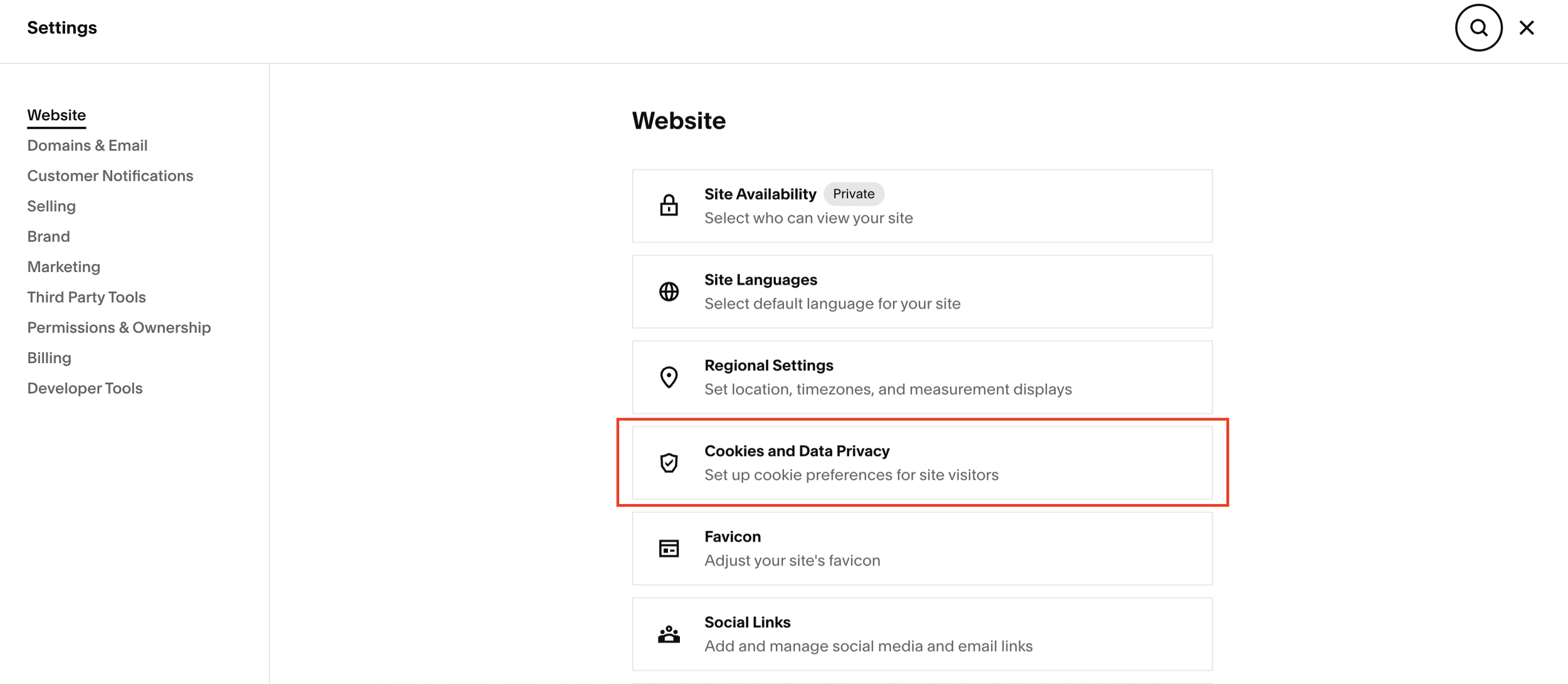
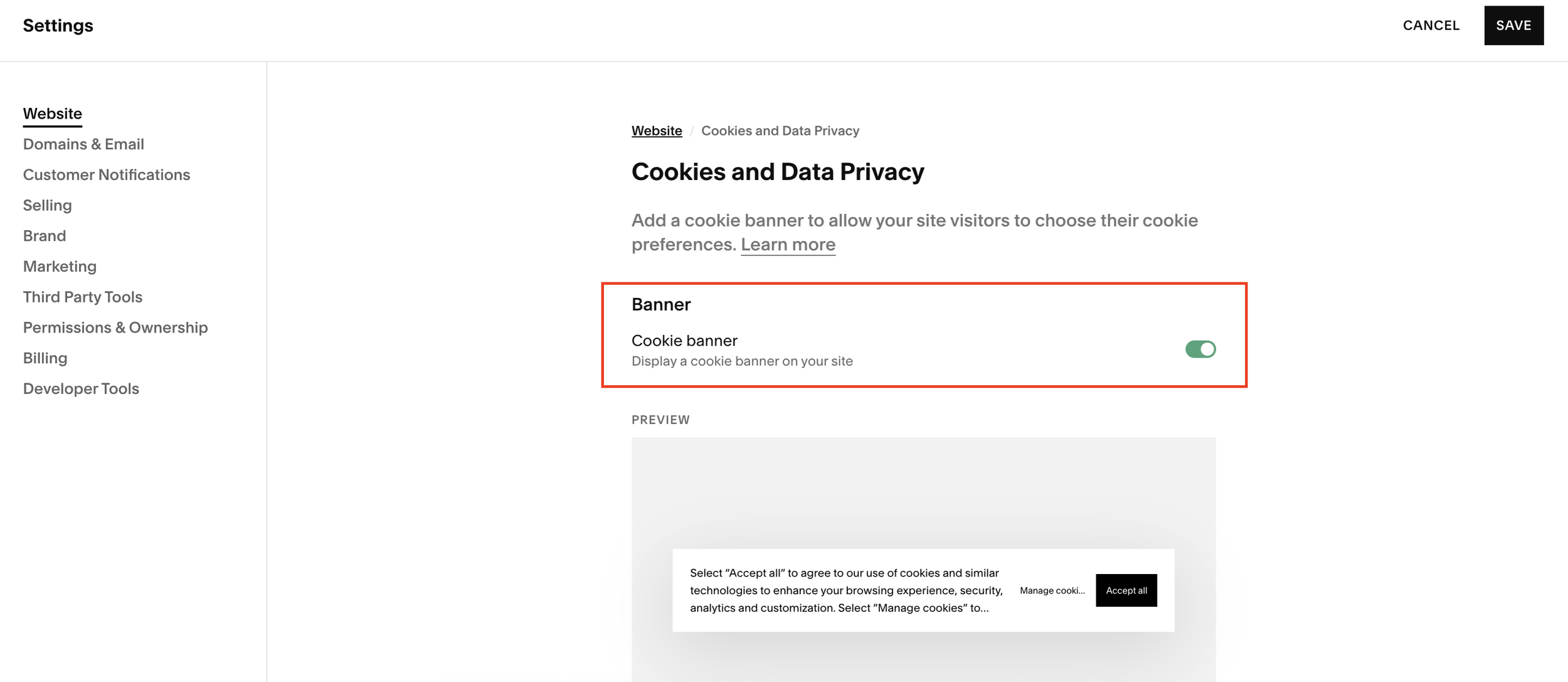
Step 2: Turn On the Cookie Banner
Once you're in the Cookies and Data Privacy section:
Toggle the cookie banner feature On.
Customize your cookie consent message.
Edit button labels and disclaimer text to suit your brand and legal requirements.
This allows you to control exactly what visitors see when they first arrive on your site.
Customizing Cookie Preferences
Squarespace gives users the ability to manage their cookie preferences directly from your website.
You can choose how the cookie preferences option appears, including styles such as:
Subfooter link
Pill-style button
The pill-style option creates a visible "Manage Cookies" button that visitors can click to update their preferences at any time.
Visitors who are happy with your cookie settings can simply click Accept and continue browsing.
Choosing the Best Cookie Banner Position
One of the most important customization options is banner placement.
Squarespace allows you to position the cookie banner in several locations:
Bottom left
Bottom center
Top left
Top right
Recommended Placement
For the best user experience, consider placing the banner:
Bottom left
Bottom center
These locations tend to be less disruptive while still remaining visible.
Many website owners avoid top-positioned banners because they can interfere with navigation and important page content.
Adjusting Banner Size and Appearance
After selecting your preferred location, you can further customize the banner by:
Changing Text Size
Increase or decrease the text size depending on your site's design and readability requirements.
Updating Colors and Themes
Squarespace allows you to choose from your existing site themes and color palettes, ensuring your cookie banner feels like a natural part of your website rather than a distracting add-on.
You can customize:
Background colors
Button styles
Text colors
Overall banner theme
This helps maintain a consistent brand experience across your site.
Preview Your Cookie Banner
Before publishing your changes:
Save your settings.
Exit the editor.
Preview your website.
Check how the cookie banner appears on desktop and mobile devices to ensure it's both visible and unobtrusive.
Final Thoughts
Although cookie banners aren't everyone's favorite feature, they're an essential part of running a compliant and trustworthy website. Fortunately, Squarespace makes it straightforward to enable cookie consent and customize its appearance to fit your brand.
By choosing a clean design, a user-friendly position, and clear messaging, you can meet privacy requirements without negatively impacting the visitor experience.