Squarespace for Multiple Properties: How to Structure Your Vacation Rental Site
Most articles about Squarespace and vacation rentals jump straight to templates and booking widgets. That's the easy part. The hard part, the one that decides whether your site brings in direct bookings or just sits there looking pretty, is structure.
Should each property get its own Squarespace site? Or one parent site with property pages underneath? How do you handle navigation when you have eight properties? What URL structure ranks best for "[location] vacation rental"? Where should the booking widget live on every page, just on property pages, or behind a separate flow?
These decisions are mostly invisible to guests, but they shape everything else. After designing vacation rental sites for clients like Pawling Mountain Club and Little Sister Getaways, this is the framework I use to make those decisions correctly the first time.
Start, scale & systemise your web design agency.
I bootstrapped my agency from zero to seven figures. The Margin is the operating system I wish I'd had.
Join The Margin

The First (and Most Expensive) Decision: One Site or Many?
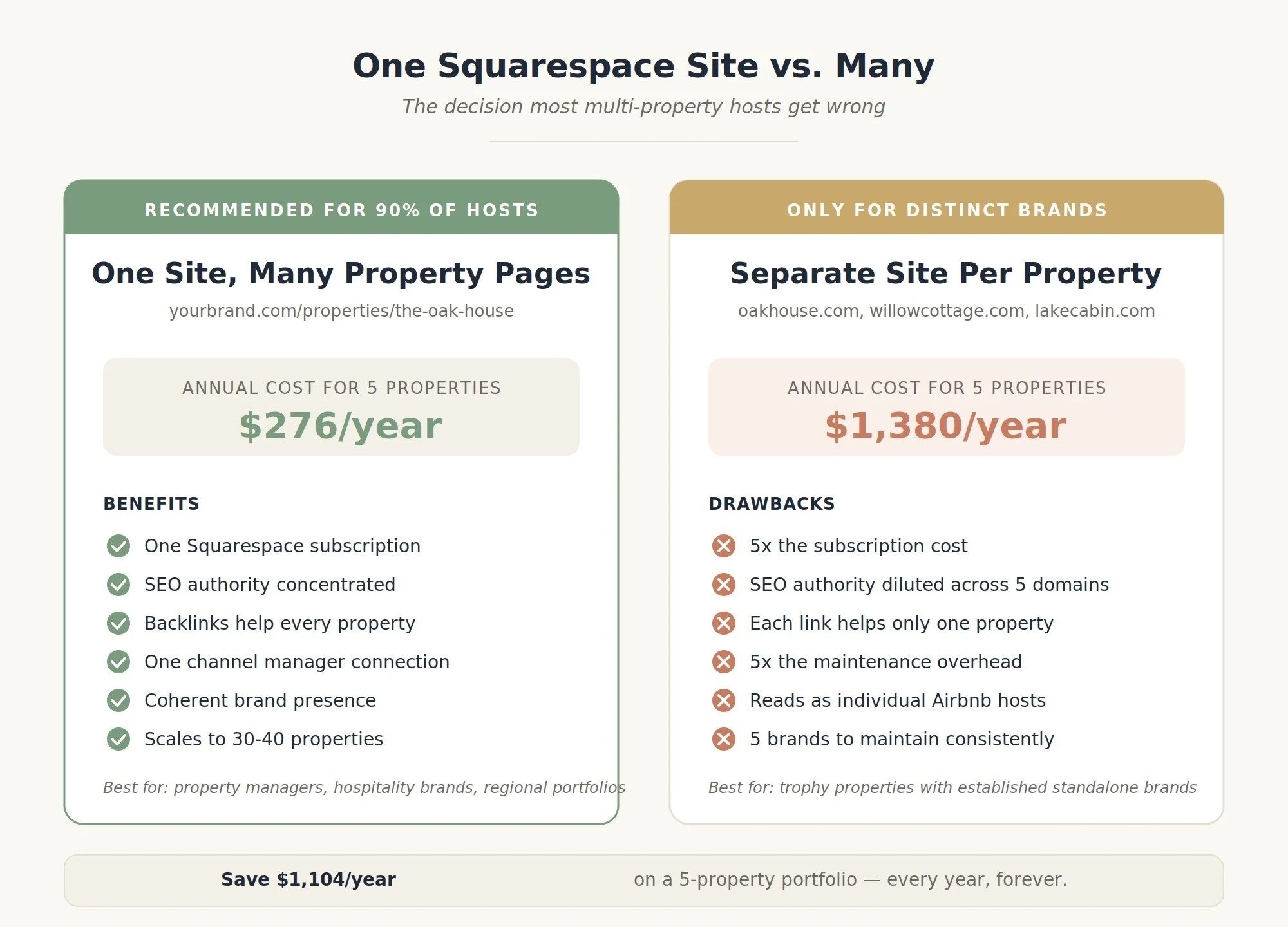
This is the question every multi-property host gets wrong. The default assumption, "I have five properties, so I need five websites" is almost always wrong, and it's expensive.
Each Squarespace site requires its own subscription. There are no multi-site discounts. Five separate Squarespace sites at $23/month each is $1,380/year just for hosting, before any design or maintenance. The same five properties on one Squarespace site costs $276/year. That's $1,100/year saved every year, forever.
But cost isn't the only factor. There are real cases where separate sites make sense. Here's how to decide.
Build ONE Squarespace site if:
All properties share a brand name or umbrella (Pawling Mountain Club, Smoky Cabin Co., Little Sister Getaways)
You operate as a property manager, agent, or hospitality company
Your properties are in the same region or category (all Catskills cabins, all beach houses on one stretch, all urban apartments in one city)
You want one piece of SEO authority concentrated in one domain
You're under ~50 properties
This is the right answer for 90% of vacation rental businesses I work with. It's cheaper, it ranks better (more on this below), and it presents your brand as a coherent business rather than a collection of unrelated Airbnb listings.
Build SEPARATE Squarespace sites if:
Each property has a distinct brand identity that's already established (different names, logos, target audiences)
Properties are in completely different regions targeting different guest demographics
You're aggregating properties from different owners under a property management contract, and each owner wants their own brand
You have one trophy property worth its own marketing presence (luxury villa, boutique hotel, named historic estate) plus a portfolio of standard rentals
The honest answer most multi-property hosts arrive at after the math: one Squarespace site with well-structured property pages. That's what the rest of this article assumes. If you genuinely need separate sites, book a call and we'll talk through your specific situation, because there's a third option (one parent site + microsites linked from it) that occasionally fits.
Why One Site Usually Ranks Better Than Many
There's a common misconception that more sites = more SEO opportunities. The opposite is true for vacation rentals.
Search engines reward topical authority concentrated on one domain. A single Squarespace site with 8 property pages, a location-based blog, area guides, and consistent internal linking will outperform 8 separate one-page sites every time. Here's why:
Backlinks compound. When a local tourism board links to your "things to do in [town]" page, that authority flows to every property page on the same site. On 8 separate sites, each link helps only one property.
Search engines recognize you as a real business. A site with multiple property pages, area content, blog posts, and an "about us" page signals an established operator. A single-property micro-site signals an individual Airbnb host, and ranks accordingly.
Long-tail keywords stack. Each property page can target its own long-tail keyword ("3 bedroom cabin near Hunter Mountain," "pet-friendly Catskills rental with hot tub"). On one parent site, they reinforce each other. On 8 sites, they don't.
Operations are simpler. One Squarespace plan, one Lodgify/Hostaway/OwnerRez connection, one analytics account, one set of brand colors and fonts to maintain. Multi-site hosts spend hours per month just keeping things in sync.
URL Structure: The Decision That Defines Your SEO
URL structure for a multi-property site is one of those decisions that's painful to change later, Squarespace lets you redirect old URLs, but every redirect costs a small amount of link equity. Get this right at the start.
There are three patterns worth considering, and the right choice depends on what you're optimizing for.
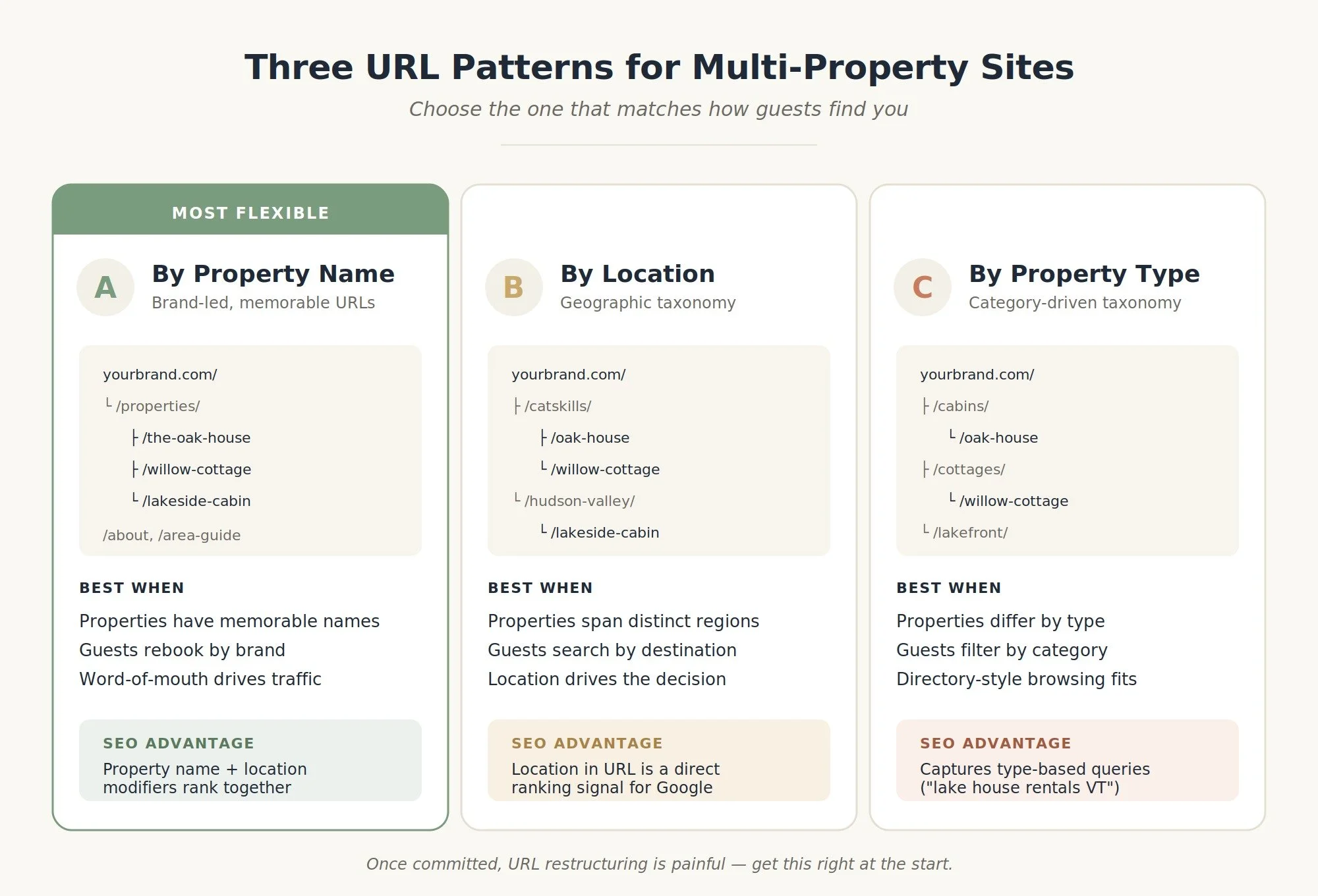
Pattern A: By property name (default and usually right)
yourbrand.com/
yourbrand.com/properties/ ← list of all properties
yourbrand.com/properties/the-oak-house
yourbrand.com/properties/willow-cottage
yourbrand.com/properties/lakeside-cabin
yourbrand.com/about
yourbrand.com/area-guide
yourbrand.com/contact
When to use: Brand-led businesses where each property has a name guests will remember and search for ("Pawling Mountain Club," "The Oak House"). Best for repeat guests and word-of-mouth referrals.
SEO advantage: Each property page ranks for its branded name plus location modifiers. Returning guests can find you by typing the property name into Google.
Pattern B: By location
yourbrand.com/
yourbrand.com/catskills/oak-house
yourbrand.com/catskills/willow-cottage
yourbrand.com/hudson-valley/lakeside-cabin
When to use: Properties spread across distinct, searchable destinations. Best when guests are searching by location ("Catskills cabin rental") rather than by brand.
SEO advantage: Location is in the URL, which Google reads as a ranking signal. Cleaner taxonomy for guests browsing by destination.
Caveat: Squarespace's URL editor lets you do this with collections and folders, but it requires careful setup. Once you've committed to a hierarchy, restructuring is painful.
Pattern C: By property type
yourbrand.com/cabins/oak-house
yourbrand.com/cottages/willow-cottage
yourbrand.com/lakefront/lakeside-cabin
When to use: Properties differ significantly by type and guests filter by type ("cabin rentals in Vermont" vs. "lake house rentals in Vermont"). Best for portfolios with clear category divisions.
SEO advantage: Captures type-based search queries cleanly. Good for filterable directory-style sites.
My default recommendation for most clients: Pattern A with location implied in the page content and metadata. It's the simplest to implement in Squarespace, the most flexible long-term, and it puts the brand name (yours) in front of the property name (memorable) in the URL, which is how guests typically search after their first visit.

Need an expert to build your Squarespace website?
Book a free kick-off call with our team to discuss your project requirements in detail.
The Property Page Template: What Every Property Page Needs
A multi-property site lives or dies on the property page. This is where guests land from search, scroll, evaluate, and either book or close the tab. Most of the Squarespace vacation rental templates out there give you a starting frame; here's what actually needs to be on every property page once you customize it.
Above the fold
Property name as the H1
One sentence location and headline ("A 3-bedroom modern cabin 15 minutes from Hunter Mountain")
Hero photo, full-width, ideally the most visually striking shot you have. Not the front exterior. Pick the photo that sells the experience.
Primary CTA: "Check availability" — visible without scrolling, linking to the booking widget or external system
Key specs as a quick scan — sleeps, bedrooms, bathrooms, pet policy. Guests verify these in the first 5 seconds.
Photo gallery
12-30 high-quality photos minimum. Group them logically: exterior → main living space → kitchen → bedrooms → bathrooms → outdoor space → views. Don't shuffle them. Don't include floor plans or marketing graphics in the main gallery — keep those in a separate section. Use Squarespace's gallery block with a grid layout (not the carousel, carousels hide the photos from guests scrolling fast).
Property description
Tell the story in 3-4 short paragraphs:
What it is and who it's for ("a 1920s farmhouse restored for couples and small families")
What makes it special (the view, the renovation, the location)
What's nearby (named local attractions, distances, drive times)
What kind of stay it suits (long weekends, family reunions, work-from-anywhere weeks)
Avoid the generic "welcome to our beautiful property" opener. Lead with something concrete and specific.
Amenities (structured list)
Not a paragraph. A structured list, ideally split into categories:
Essentials: Wi-Fi, heating/AC, parking, kitchen
Outdoors: hot tub, fire pit, deck, grill
Comfort: coffee maker, smart TV, board games, books
Family/pet: crib, high chair, dog-friendly, fenced yard
Guests scan these. Structure beats prose every time.
Sleeping arrangements
A clear breakdown by bedroom: "Bedroom 1: king bed | Bedroom 2: queen bed | Bedroom 3: two twin beds | Living room: pullout sofa." This is one of the top three questions every guest asks. Surface it.
Location section
Embed a Google Map (Squarespace's Map Block) and a short paragraph about what's around. Don't post the exact address, privacy and guest expectations both push toward "Town, State" with the precise address only shared at booking.
Booking widget
Either embed your direct booking widget here (Lodgify, Hostaway, OwnerRez, or another channel manager) or place a prominent "Check availability" CTA that routes to your booking system. This should appear at least twice on the page: once near the top, once near the bottom.
Reviews
Pull 3-6 of your best reviews from Airbnb, VRBO, or Google. Don't fake them, don't curate too aggressively (a 4-star review with thoughtful praise reads more credible than seven 5-star one-liners). Mark them up with Review schema for rich-result eligibility.
FAQ
Property-specific FAQ: check-in time, pet policy, parking, Wi-Fi speed, cancellation policy, what's provided (towels, soap, coffee), what isn't (firewood, beach gear), house rules. 8-12 questions. Use Squarespace's Accordion Block.
Final CTA
The page closes with one more "Check availability" CTA. Guests who scroll all the way down are ready to act, don't make them scroll back up to find the booking button.
Navigation: How to Handle 3, 8, or 30 Properties
The right navigation pattern depends on how many properties you have.
2-6 properties
Put each property in the main navigation by name. Guests can scan all options in one glance.
Home | The Oak House | Willow Cottage | Lakeside Cabin | About | Contact
7-15 properties
Use a dropdown menu under a "Properties" or "Stays" parent link.
Home | Properties ▾ | About | Area Guide | Contact
The dropdown lists all properties alphabetically or grouped by location.
16+ properties
Build a properties index page that functions as a directory, with filters (by location, capacity, type). The main nav says "Browse Stays" and routes to /properties where guests filter and select.
This is also where Squarespace starts to strain at the seams. If you have more than 30-40 properties and need advanced filtering (price range, dates, amenities), you've outgrown what a Squarespace site can do natively. You'll either need to embed a Lodgify or Hostaway-style property search widget that handles the filtering, or consider whether Squarespace is still the right platform.
Booking Flow: Where to Send Guests After "Check Availability"
This is the single highest-impact decision for direct bookings. There are three architectures, ordered from simplest to most powerful.
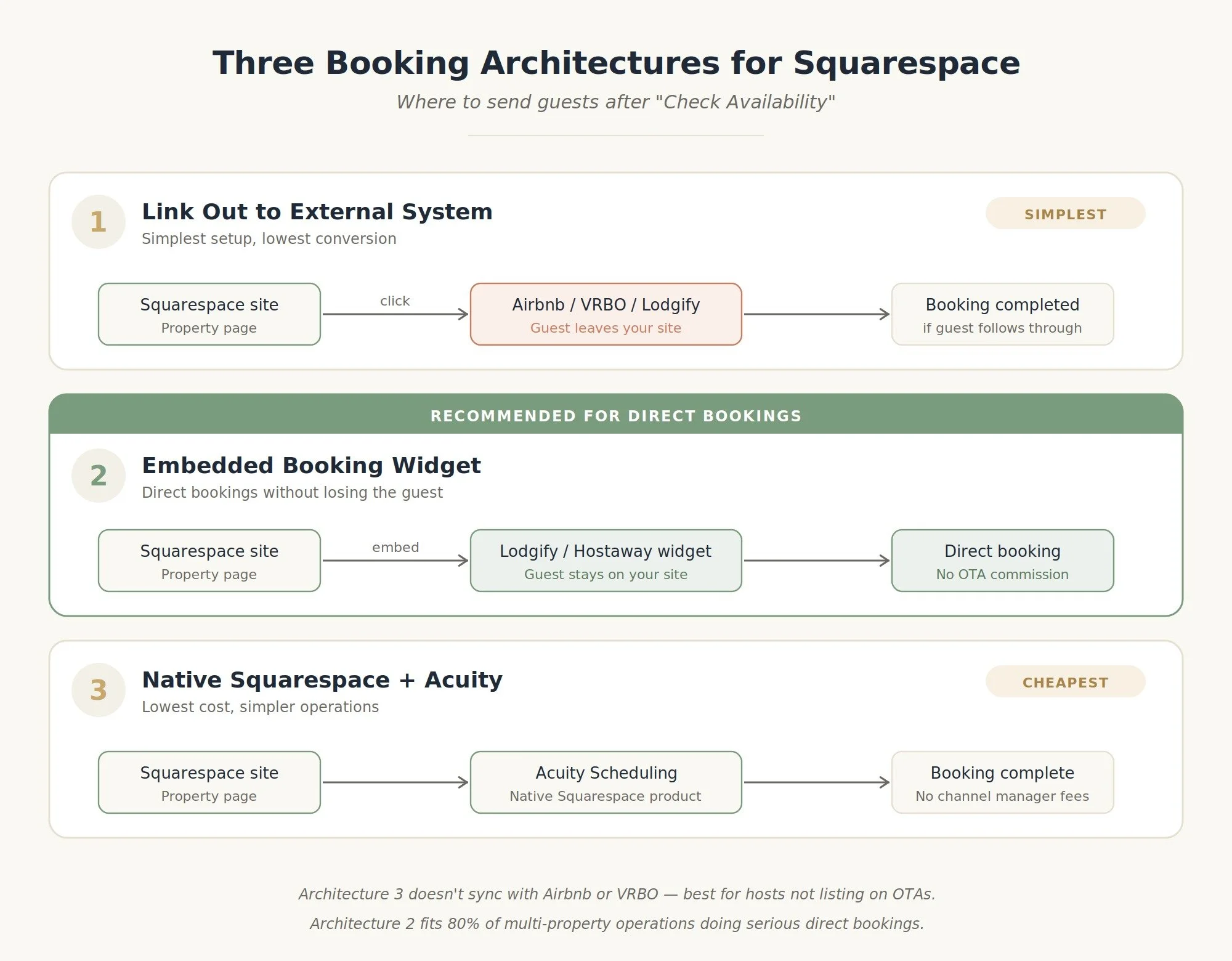
Architecture 1: External booking system (link out)
Your "Check availability" button links out to Airbnb, VRBO, or your direct-booking platform (Lodgify, OwnerRez, Hostaway) where the booking actually happens.
Pros: Simplest setup, no embeds to maintain.
Cons: Guests leave your site to book. You lose them if they don't complete the booking on the external page.
When this works: Brand-new sites still validating demand, or properties heavily reliant on OTAs (Airbnb/VRBO) for distribution.
Architecture 2: Embedded booking widget (recommended)
You embed a booking widget from your channel manager (Lodgify, Hostaway, OwnerRez, Smoobu) directly into each property page. Guests select dates, see pricing, and check out without leaving your site.
Pros: Direct bookings without commission. Branded experience. Higher conversion than linking out.
Cons: Requires a paid channel manager subscription. Embed code needs to be added to every property page.
When this works: Anyone with 2+ properties who wants direct bookings as a meaningful channel. The math almost always works out: a single direct booking that bypasses a 14-17% Airbnb host fee pays for several months of channel manager subscription.
Architecture 3: Full direct booking on Squarespace (advanced)
You handle the entire booking flow inside Squarespace using Acuity Scheduling + Squarespace Commerce. Each property is a "service" or "product" with availability and pricing.
Pros: Lowest ongoing cost (no channel manager subscription). Native to Squarespace.
Cons: Doesn't sync with Airbnb/VRBO automatically, you have to manage calendars manually. Limited to simple pricing structures. No multi-channel distribution.
When this works: Solo hosts with 1-3 properties who don't list on Airbnb/VRBO and want the cheapest possible setup.
The Supporting Pages That Earn Bookings
A multi-property site needs more than property pages. The supporting pages do the SEO heavy lifting and convert browsers into bookers.
Area guide / things to do: one of the highest-value pages you can build. Guests searching "things to do in [town]" land here, see your properties in the sidebar or footer, and book. Aim for 1,500-2,500 words covering attractions, restaurants, hiking, seasonal events.
About / our story: humanizes the operation. Photos of the owner or team. The "why we started this" story. Builds trust for hesitant first-time bookers.
FAQs: site-wide FAQ covering booking policies, payment, cancellations, security deposits, pet rules, group size limits. Property-specific FAQs go on property pages.
Blog: quarterly seasonal posts ("best time to visit [region]," "[town] in autumn," "what to pack for a Catskills weekend"). Each post links to relevant properties.
Contact: separate from booking. Phone, email, contact form. Some guests want to ask before they book.
Local partner page (optional but powerful): list local businesses you partner with: restaurants, outfitters, guides. They link to you, you link to them, everyone's local SEO improves together.
Common Mistakes I See on Multi-Property Squarespace Sites
A handful of patterns come up over and over when I audit existing sites:
Identical property pages. Same description template, same amenity list, same photo style with different photos. Search engines see duplicate content. Each page needs unique copy, even if it's a template fill-in.
Hidden booking buttons. "Check availability" buried in the footer, in a sidebar, behind a hamburger menu. The booking CTA should appear at least twice on every property page, always visible.
No location in URLs or page content. "The Oak House" with no mention of Hunter, NY, or Catskills anywhere prominent. Guests search by location; the page needs to match.
Photo carousels instead of grids. Carousels hide your photos. Use a grid layout that shows 12 thumbnails at once.
One booking widget for all properties. Each property needs its own configured widget with that property's calendar, pricing, and rules. A site-wide search box is fine in addition, not instead.
Treating the homepage as a brochure. The homepage should drive guests to either the properties index or a specific property within 2 clicks. Save the brand story for the about page.
Inconsistent property naming. "The Oak House" on one page, "Oak House" on another, "Oak Cabin" in the URL. Pick one name and use it everywhere.
Frequently Asked Questions
Can I run multiple vacation rentals on one Squarespace site?
Yes, and for most operators it's the recommended approach. One Squarespace plan can host as many property pages as you need, all sharing one domain and one piece of SEO authority. You'd need a separate Squarespace subscription only if you wanted each property on its own independent domain.
How much does Squarespace cost for multiple properties?
One Squarespace Business plan ($23/month annually) covers a multi-property site with any number of property pages. Adding a channel manager like Lodgify ($15-25/property/month) or Hostaway (custom pricing) handles the booking and calendar sync. A 5-property operation typically runs $100-150/month total in software.
Should each property have its own domain?
Only if each property has a distinct brand that guests already search for by name. For a property manager or hospitality brand, one domain with property pages is stronger SEO and cheaper to maintain.
Can Squarespace handle 20+ properties?
Yes, up to about 30-40 properties before native filtering and search becomes a limitation. Beyond that, you'll want to embed a property search widget from a channel manager that handles filtering on its end, or move to a platform built for property catalogs.
What's the best Squarespace template for multiple properties?
Templates from the Real Estate & Properties category (Hidano, Palermo, Suffolk) work well, as do all-purpose templates like Bedford and Bailard.
Can I sync Airbnb and VRBO bookings with my Squarespace site?
Not natively. You need a channel manager (Lodgify, Hostaway, OwnerRez, Smoobu) that syncs your calendars across Airbnb, VRBO, Booking.com, and your direct booking widget on Squarespace. The channel manager is the source of truth; Squarespace displays the booking widget.
How long does it take to build a multi-property Squarespace site?
A 5-property site takes 3-5 weeks from kickoff to launch when done properly: 1 week for content gathering and photography, 1-2 weeks for design and build, 1 week for content entry, 1 week for testing and launch prep. Doing it yourself extends the timeline significantly.
The Bottom Line
Structuring a multi-property Squarespace site well is mostly about three decisions made in the right order:
One site or many. Almost always one, unless you're running distinctly branded businesses.
URL pattern. Property name is the most flexible default; location works if guests search geographically.
Booking architecture. Embedded widget (via Lodgify, Hostaway, or similar) is the right answer for almost everyone who's serious about direct bookings.
Get those three right and the rest — property page templates, navigation, supporting content, schema — falls into place. Get them wrong, and you'll spend years fighting the structure instead of growing the business.
If you're planning a multi-property Squarespace site or restructuring an existing one, explore my vacation rental web design service — I've built sites like Pawling Mountain Club and Little Sister Getaways that handle this architecture well, and book a discovery call if you want help mapping it out for your specific portfolio.
You can also read more about custom Squarespace website design or my ongoing website management service for properties already live.