Is Squarespace HIPAA Compliant? What Medical Practices Need to Know in 2026
This article is general guidance from a Squarespace designer's perspective and is not legal advice. Always consult a HIPAA compliance specialist before making decisions about how your practice handles protected health information.
If you're a doctor, therapist, dentist, or running any kind of healthcare practice, you've probably asked the same question I get every week: is Squarespace HIPAA compliant?
The answer matters. Get it wrong, and you're looking at fines that start at $137 per violation and climb past $2 million annually for repeat violations under the HHS Office for Civil Rights enforcement framework. Get it right, and you can run a beautiful, low-maintenance Squarespace website for your practice without putting patient privacy — or your license — at risk
Most articles on this topic give you a vague yes or no. The reality is more useful than that, and it's what I'll walk you through here. After designing over 700 Squarespace websites, including healthcare practices like Prova Health and Slopes Bio, here's what actually works.
Start, scale & systemise your web design agency.
I bootstrapped my agency from zero to seven figures. The Margin is the operating system I wish I'd had.
Join The Margin

The Short Answer
Squarespace's website hosting is not HIPAA compliant. Squarespace will not sign a Business Associate Agreement (BAA) for its core website hosting service, which means you cannot legally collect, transmit, or store Protected Health Information (PHI) through a standard Squarespace site.
However, there's an important exception most articles miss: Squarespace does sign a BAA for Acuity Scheduling on the Powerhouse or Premium plans. Acuity is the only Squarespace product currently designed to handle PHI in a HIPAA-consistent way, per Squarespace's official Acuity HIPAA documentation.
So the practical answer for most medical practices is: yes, you can use Squarespace but only with the right setup.
What "HIPAA Compliant" Actually Means for a Website
Before going further, let's clear up two terms most articles blur together.
HIPAA (Health Insurance Portability and Accountability Act) is the U.S. law that protects patient health information. It applies to "covered entities," healthcare providers, health plans, and clearinghouses and to their "business associates," meaning any vendor that creates, receives, maintains, or transmits PHI on the covered entity's behalf.
A BAA (Business Associate Agreement) is the contract that legally binds a vendor to HIPAA's requirements. Without a signed BAA, every disclosure of PHI to that vendor is technically a HIPAA violation. The U.S. Department of Health and Human Services has fined practices millions of dollars for missing BAAs in OCR enforcement actions.
PHI (Protected Health Information) is anything that combines a person's identity (name, email, phone, address, IP address) with health information (symptoms, diagnoses, treatments, medications, appointment reasons, insurance info).
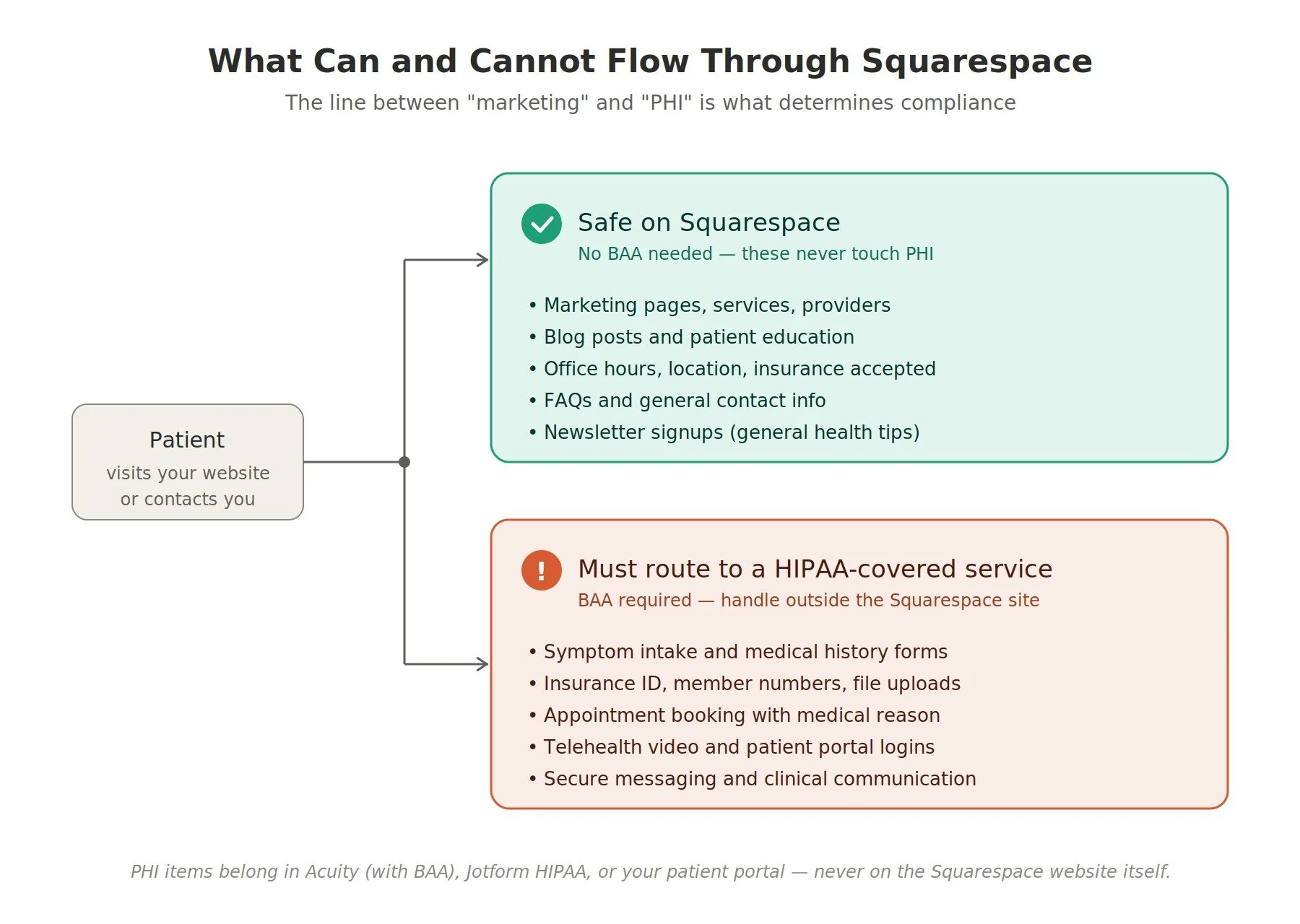
The key thing: a website doesn't need a BAA if it never touches PHI. A pure marketing site that only shows your services, providers, and office hours? No BAA needed. The moment you add a "Request an Appointment" form that asks "what's bringing you in?" that field collects PHI, and now the entire form-handling pipeline needs to be HIPAA-compliant.
That distinction is what makes Squarespace workable for most practices.
What You CAN Legally Do on Squarespace
Here's what a medical practice can confidently put on a standard Squarespace site without HIPAA exposure:
Public-facing marketing content. Your homepage, about page, services pages, provider bios, office locations, hours, insurance accepted, blog posts, FAQs, news, testimonials (without identifying medical conditions), and any educational content.
Basic contact forms that collect name, email, phone, and a generic "what would you like to discuss?" field, as long as you train your team and patients not to include health details. I recommend a clear notice next to the form: "Please do not include medical information in this message. To discuss your health, please call our office or use our patient portal."
Newsletter signup forms for general health tips (no personalization based on conditions).
Provider profile pages, credentials, specialties, and education.
Photo galleries of your office (not patient photos, even with consent, those have separate considerations).
Booking links that route patients out to a HIPAA-compliant external system (Jane App, SimplePractice, Healthie, etc.).
Blog content about general health topics, treatment approaches, and patient education.
This covers what 80% of medical practices actually need from a website. If your site is fundamentally a marketing tool that drives patients to call or book elsewhere, Squarespace works beautifully for it.

Need an expert to build your Squarespace website?
Book a free kick-off call with our team to discuss your project requirements in detail.
What You CANNOT Do on Squarespace (Without Workarounds)
These are the no-go zones on a standard Squarespace site:
Intake forms that collect medical history. "What's your reason for visiting?" with a free-text field, symptom questionnaires, medication lists, allergy lists, all PHI.
Forms that ask for insurance member ID or policy numbers.
Patient portals with login areas displaying any patient-specific information.
Telehealth video integrations embedded directly on your site.
Appointment systems collecting medical history at booking (the appointment time itself isn't PHI; the reason for the appointment usually is).
Email confirmations or autoresponders that include health information. This is the violation most practices accidentally commit, Squarespace's built-in form notifications go through standard email, which isn't HIPAA-compliant.
File uploads of insurance cards, IDs, or medical records.
Live chat widgets where patients might disclose health information.
If you need any of these, you'll either use Acuity Scheduling (which does have BAA coverage) or integrate a third-party HIPAA-compliant tool. Both approaches work.
The Three Workarounds That Actually Work
Here's where most articles get vague. Let me give you three concrete approaches, ranked by which fits which kind of practice.
Workaround 1: Use Acuity Scheduling for All PHI Touchpoints
This is the most elegant solution for solo practitioners and small practices, because it keeps everything inside the Squarespace ecosystem.
Acuity Scheduling is owned by Squarespace, and on the Powerhouse or Premium plans, you can request a signed BAA directly through your Acuity settings. Once signed, Acuity becomes HIPAA-eligible for handling appointment-related PHI, including medical reasons for visits, intake questions, and patient details.
The setup at a high level:
Upgrade to Acuity Powerhouse or Premium.
In Acuity, go to Scheduling Page → Settings, find the BAA link below the Account Language dropdown, and complete the BAA submission.
Enable HIPAA mode, which restricts how PHI appears in emails and confirmations.
Configure your appointment types and intake fields with PHI handling in mind.
Embed the Acuity scheduler on your Squarespace site (it lives within Acuity, but displays on your Squarespace pages).
The important nuance: the BAA covers only Acuity, not your Squarespace site itself. If you also collect PHI through Squarespace's native contact form, that contact form is still a violation regardless of your Acuity BAA.
Read more about my Acuity Scheduling integration service here.
Best fit: solo practitioners, small therapy practices, dental offices, chiropractors, functional medicine clinics, any practice where Acuity can handle the booking-and-intake workflow.
Workaround 2: Embed a HIPAA-Compliant Third-Party Form
If your practice needs more form complexity than Acuity provides, detailed multi-page intake forms, insurance card uploads, conditional logic, embed a HIPAA-compliant form provider that signs its own BAA.
The three I'd recommend:
Jotform HIPAA Healthcare plan. Most cost-effective. Signs BAAs. Wide field-type support. Easy embed via Squarespace's Code Block.
Formstack Forms (HIPAA edition). More expensive but more robust for larger practices.
MachForm or HIPAAtizer. Specialty alternatives if you have unusual needs.
The setup pattern is the same regardless of which provider you choose:
Sign up for the provider's HIPAA-tier plan (it's always more expensive than the standard tier).
Sign the BAA with the provider before you collect any PHI.
Build your form within the provider's interface.
Embed the form into your Squarespace page using a Code Block (paste the iframe or JavaScript snippet they give you).
Configure email notifications to go through a HIPAA-compliant email service (Hushmail, Paubox, or Google Workspace with a signed BAA) not Squarespace's built-in email notifications.
One critical detail people miss: the form itself is HIPAA-compliant, but the notification email Squarespace sends when someone submits is not. You need to disable Squarespace's notification entirely and let the form provider handle notifications through its own HIPAA-compliant email system.
Best fit: practices that need detailed intake forms beyond what Acuity offers, multi-provider practices, anyone collecting insurance cards or document uploads.
Workaround 3: Keep Squarespace Purely Marketing, Route PHI Externally
The simplest approach. Your Squarespace site does only what Squarespace does well, beautiful marketing, and every PHI interaction happens on a HIPAA-compliant external platform.
The pattern:
Your Squarespace site has zero forms that collect PHI.
Your "Book Appointment" button links out to a HIPAA-compliant patient portal: SimplePractice, TherapyNotes, Jane App, IntakeQ, Healthie, Athenahealth, or your EHR's patient-facing portal.
All intake, scheduling, secure messaging, and clinical communication happens inside that portal.
Squarespace handles your public face: services, providers, blog, FAQs, contact info.
This is the cleanest separation, and it's what I recommend for therapists, mental health practices, and any practice that already has a patient management platform. You get Squarespace's design quality on the front end and a purpose-built HIPAA platform on the back end.
Best fit: therapy practices (SimplePractice or TherapyNotes is almost universal here), established practices already using an EHR with a patient portal, and any practice where the website is fundamentally a marketing channel.
Decision Tree: Which Workaround Fits Your Practice?
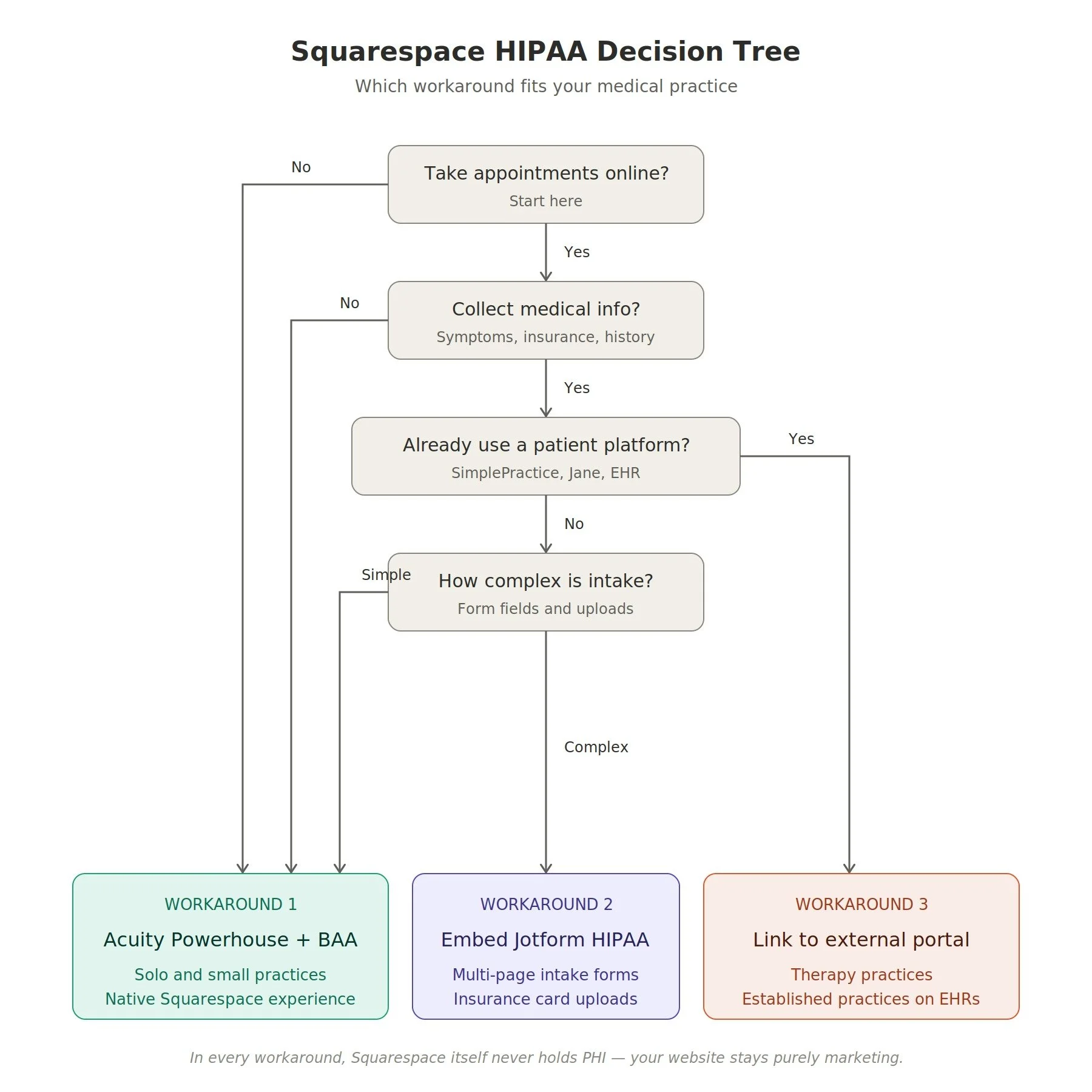
Here's a quick decision framework I walk new clients through:
Q1: Do you take appointments online?
No → You're golden. Use a standard Squarespace site with a basic contact form (no PHI collection). Workaround 3 by default.
Yes → Continue to Q2.
Q2: Do you collect medical reasons, symptoms, or insurance info during booking?
No, just name and time → Workaround 1 (Acuity Powerhouse with BAA) or Workaround 3 (link to external scheduler). Either works.
Yes → Continue to Q3.
Q3: Do you already use a patient management platform (SimplePractice, Jane App, TherapyNotes, EHR)?
Yes → Workaround 3. Use Squarespace as marketing only and link out to your existing platform. Lowest complexity.
No → Continue to Q4.
Q4: How complex is your intake?
Simple: appointment reason, basic intake → Workaround 1 (Acuity Powerhouse). Cleanest experience for patients.
Complex: multi-page forms, insurance uploads, medical history → Workaround 2 (Jotform HIPAA or similar) embedded into Squarespace.
For most solo practitioners and small practices I work with, the answer lands at Workaround 1 or 3, both of which let you use Squarespace as the primary website without major compromises.
When You Should NOT Use Squarespace at All
Honest take: Squarespace isn't right for every healthcare practice. Skip it entirely if any of these apply:
You need EHR/EMR integration built into the website (patient record access, e-prescribing, clinical documentation). Squarespace can't do this, you need a purpose-built healthcare platform.
You run telehealth as a primary service with video consultations launched from your website. Telehealth platforms need their own dedicated infrastructure.
You're a hospital or large multi-site practice with custom workflows, multiple departments, role-based access, and complex integrations.
Your patient portal is the website, not a separate platform you link to.
You have a compliance officer who has explicitly forbidden non-BAA hosting, even with workarounds.
For solo practitioners, small practices, and most outpatient specialties, though? Squarespace plus the right workaround handles the job.
Common Mistakes I See Practices Make
A handful of patterns come up repeatedly when I audit existing medical Squarespace sites:
Using Squarespace's native contact form to ask "what's bringing you in?" This is the most common violation. The fix: change the form to ask only for name, email, phone, and a generic "preferred contact method" and add a clear notice that no medical information should be entered.
Email autoresponders that quote the form submission back. Squarespace sends a confirmation email containing whatever the patient typed. If they typed PHI (even though you asked them not to), it's now in non-encrypted email. Disable form autoresponders that include submitted content.
Mixing the Acuity BAA with the rest of Squarespace. The BAA covers Acuity only. Patients booking through Acuity but messaging through your Squarespace contact form are sending PHI through a non-covered channel.
Forgetting that staff inboxes are part of the chain. If your Squarespace form sends notifications to a Gmail or Outlook account that doesn't have its own BAA, you've broken compliance even if the form provider was compliant. Either use Google Workspace or Microsoft 365 with a signed BAA, or use a HIPAA-compliant email service like Hushmail or Paubox.
Not training staff on what counts as PHI. Compliance isn't just about the website. If a staff member emails a patient back with treatment details from a personal Gmail, that's a violation regardless of how compliant your forms are.
What Real Compliance Costs You
Let's be honest about the cost difference, because it matters for solo practitioners:
| Component | Standard Squarespace | HIPAA-Aware Squarespace Setup |
|---|---|---|
| Squarespace plan | ~$23/mo (Business) | ~$23/mo (Business) |
| Acuity Scheduling | Optional | $61/mo (Powerhouse, BAA-eligible) |
| HIPAA email (if needed) | Free (built-in) | $20–30/mo (Hushmail or Paubox) |
| HIPAA forms (if Workaround 2) | N/A | $39+/mo (Jotform HIPAA) |
| Patient portal (if Workaround 3) | N/A | Already part of your SimplePractice/Jane subscription |
For a solo practitioner using Workaround 1 (Acuity + Squarespace), you're looking at roughly $80-90/month total for a fully HIPAA-aware setup. That's still significantly less than custom WordPress hosting on a HIPAA-compliant host, which typically starts at $200-500/month.
A Quick Compliance Checklist
Before you launch a medical practice site on Squarespace, run through this:
Identified every place on the site that could touch PHI (forms, chat, booking, email)
Confirmed which workaround you're using for each touchpoint
Signed a BAA with every vendor that handles PHI (Acuity Powerhouse, Jotform, your email provider, your patient portal)
Disabled Squarespace's native contact form, OR removed all PHI-collecting fields from it, OR added a clear notice telling patients not to submit health info
Disabled or restricted form autoresponders that quote submission content
Confirmed all staff inboxes receiving form submissions are HIPAA-compliant
Trained staff on what is and isn't safe to send through Squarespace channels
Documented your compliance setup in writing (you'll need this if OCR ever audits you)
Reviewed setup annually, especially when you add new features or vendors
Frequently Asked Questions
Is Squarespace HIPAA compliant?
Squarespace's main website hosting is not HIPAA compliant — it doesn't sign Business Associate Agreements for hosting. However, Acuity Scheduling (a Squarespace product) is HIPAA-eligible on the Powerhouse and Premium plans, and Squarespace will sign a BAA specifically for Acuity. For a medical practice site, you can use Squarespace as long as you don't collect PHI through the standard site and instead use Acuity or a third-party HIPAA-compliant tool for any PHI touchpoints.
Does Squarespace sign a BAA?
Squarespace signs BAAs only for Acuity Scheduling on Powerhouse or Premium plans, and custom BAAs are available on Acuity's Enterprise plan for an additional cost. Squarespace does not sign BAAs for its core website hosting, e-commerce, email campaigns, or other features.
Can I use Squarespace contact forms for a medical practice?
Yes, but only for non-PHI inquiries. Use the contact form for general questions (hours, services offered, scheduling logistics) and add a clear notice asking patients not to include health information. Any form that collects medical history, symptoms, or insurance details needs to be replaced with a HIPAA-compliant alternative like Acuity (with BAA) or Jotform HIPAA.
What's the difference between Acuity Scheduling and Squarespace Scheduling?
They're the same product — Squarespace acquired Acuity Scheduling in 2019 and rebranded it as Squarespace Scheduling for some users, then reverted to using "Acuity" branding. The HIPAA functionality is identical. You need the Powerhouse or Premium plan to access HIPAA mode and sign a BAA.
How much does HIPAA-compliant Squarespace cost?
A solo practitioner using Squarespace's Business plan plus Acuity Powerhouse with a signed BAA typically spends around $80-90/month total. If you also need HIPAA-compliant email (Hushmail or Paubox) and third-party HIPAA forms (Jotform HIPAA), expect $120-150/month.
Is Wix or WordPress more HIPAA-friendly than Squarespace?
WordPress can be more HIPAA-friendly when paired with a HIPAA-compliant host like HIPAA Vault or Liquid Web HIPAA hosting, but it requires more technical maintenance and typically costs $200-500/month. Wix's position is similar to Squarespace's — limited BAA coverage. For most small practices, the workarounds described in this article make Squarespace a more practical and cheaper option than WordPress.
What happens if I'm not HIPAA compliant?
The HHS Office for Civil Rights (OCR) can issue fines starting at $137 per violation, with annual maximums above $2 million for repeat or willful violations. State attorneys general can also bring HIPAA-related actions, and patients can file complaints. Beyond fines, a HIPAA breach typically requires patient notification, sometimes media notification, and damages your practice's reputation significantly.
The Bottom Line
Squarespace is not HIPAA compliant out of the box, and it never will be, its core hosting is built for general business websites, not regulated healthcare. But that's the wrong question.
The right question is: can a medical practice run a Squarespace website without violating HIPAA? And the answer is yes — if you use Acuity Scheduling (with a signed BAA) for any PHI touchpoints, embed third-party HIPAA-compliant forms when you need more complexity, or simply route all PHI to an external patient portal.
Most of the small and solo medical practices I work with land somewhere in this combination, and the result is what they actually need: a beautiful, low-maintenance website that builds trust with new patients, supports their existing patient relationships, and stays on the right side of compliance.
If you're planning a medical practice website on Squarespace and want help designing a setup that's both beautiful and compliant from day one, book a discovery call and I'll walk you through the right architecture for your specific practice. I've designed healthcare websites for clients like Prova Health and Slopes Bio, and I can show you what a HIPAA-aware Squarespace site looks like in practice.
You can also explore my SEO services for medical practices, which is the next step once your compliant site is live, or read more about website hosting and maintenance if you're worried about ongoing compliance reviews.