Using Squarespace's Brand Identity Tool
Many Squarespace users don’t realise that Squarespace includes a built-in AI brand identity generator. It’s a powerful but slightly hidden feature that can help you define your brand voice, messaging, and positioning, especially if you’re just getting started or want inspiration.
In this guide, you’ll learn where to find Squarespace’s brand identity tool, how it works, and how to use it effectively to build a stronger brand.
What Is Squarespace’s Brand Identity Tool?
Squarespace’s brand identity feature uses Beacon AI, the platform’s built-in artificial intelligence system. It’s designed to help you describe:
Who you are
What your business does
What makes your brand unique
How your brand should sound and feel
Squarespace then uses this information to generate brand descriptions, messaging, and even email campaign copy.
Anywhere you see the Beacon AI logo, you’ll know AI is powering the feature.
Where to Find Brand Identity in Squarespace
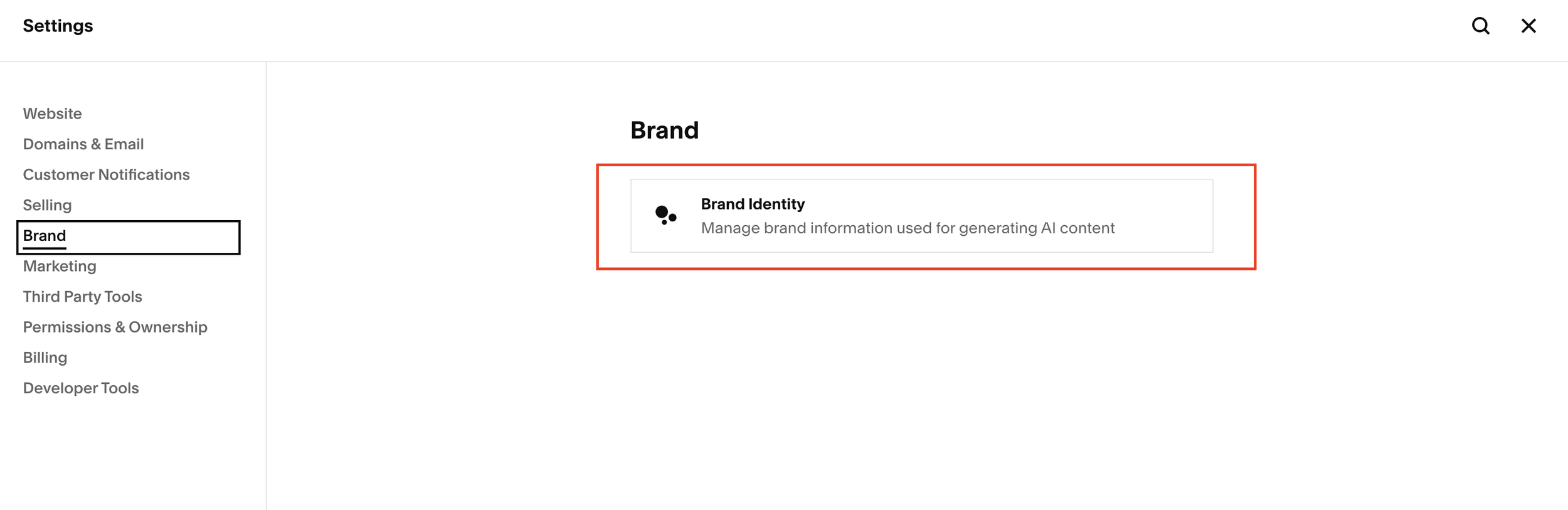
The brand identity generator isn’t obvious at first glance. Here’s how to access it:
Open your Squarespace site
Click the cog icon (Settings)
In the sidebar, select Brand
Click Brand Identity
That’s it, you’re now inside Squarespace’s AI-powered brand identity tool.
Start, scale & systemise your web design agency.
I bootstrapped my agency from zero to seven figures. The Margin is the operating system I wish I'd had.
Join The Margin


Need an expert to build your Squarespace website?
Book a free kick-off call with our team to discuss your project requirements in detail.
How to Create a Brand Identity With Beacon AI
Once you’re in the Brand Identity section, Squarespace explains its purpose clearly:
A brand identity describes who you are, what you do, and what makes you special.
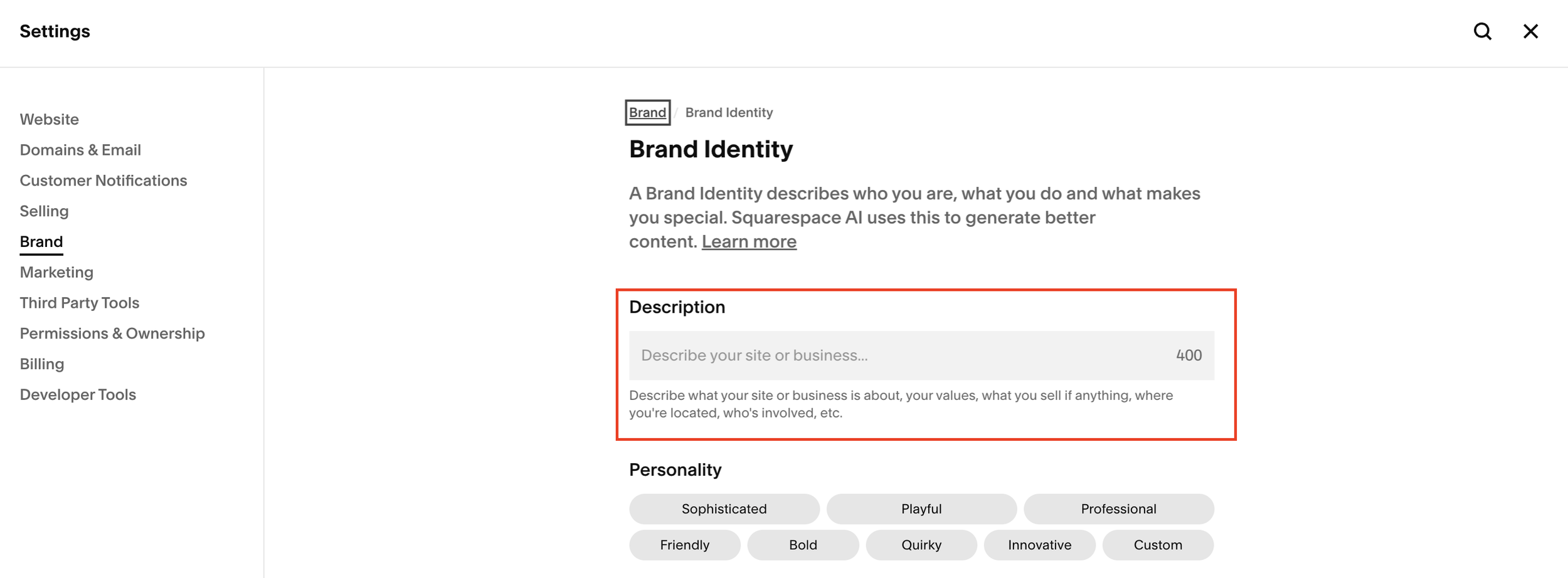
You’ll be given up to 400 characters to describe your business. This is one of the most important steps, because everything Squarespace generates is based on this input.
What to Include in Your Description
For best results, try to include:
Your name or company name
What you sell or what service you offer
Your values or approach
Where you’re based (or if you’re global)
Who’s involved in the business
The more specific you are, the better the AI output will be.
Choosing Your Brand Personality
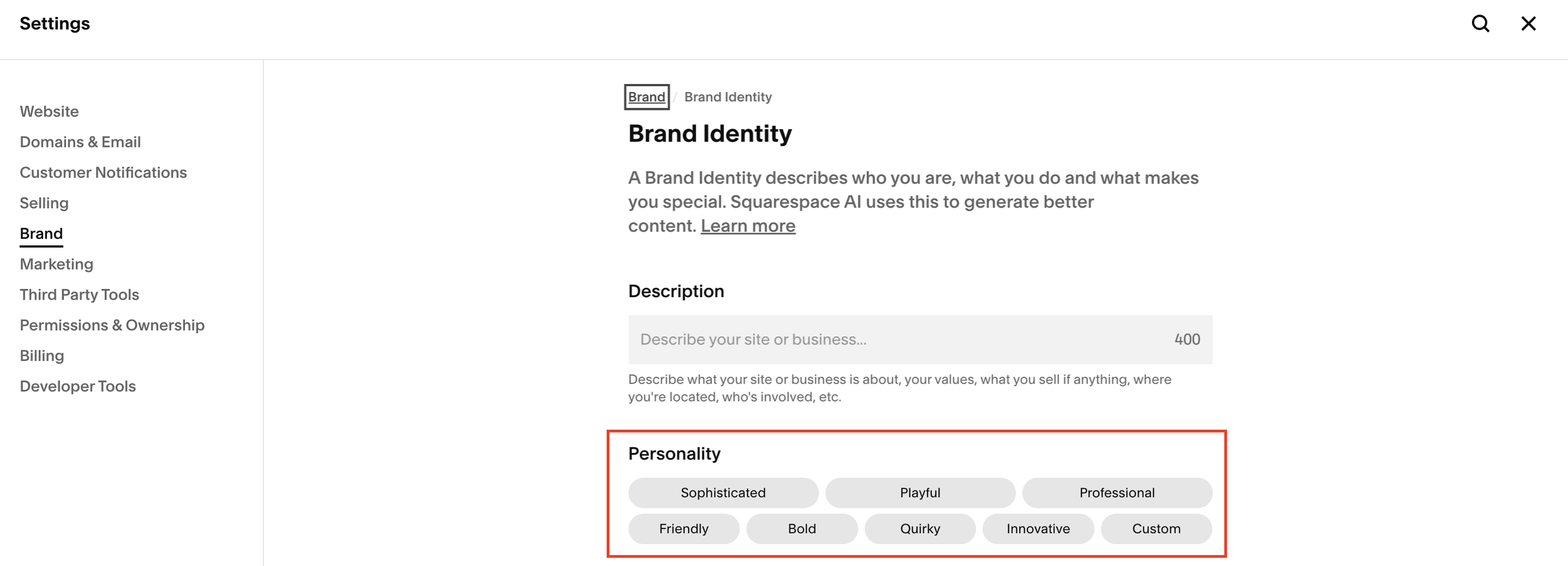
After entering your description, you can select a brand personality. Squarespace offers presets such as:
Sophisticated
Playful
Professional
Friendly
Bold
Quirky
Innovative
Custom
You can also experiment by entering your own custom tone. Changing the personality can dramatically affect the results, so it’s worth testing multiple options.
Reviewing the AI-Generated Brand Content
Once generated, Squarespace will show you a preview that may include:
A short brand description
A suggested site title
Example messaging
Sample email campaign copy
One important thing to note: Squarespace pulls data from your site title, so make sure your site name is set correctly before judging the output.
If something looks off, you can:
Update your site title
Adjust your description
Change the personality
Regenerate the brand identity
Small tweaks can lead to much better results.
Why Squarespace Pushes Email Campaigns
One noticeable change is that email campaigns now play a big role in the brand identity output. Instead of just generating a static brand description, Squarespace often suggests email copy alongside it.
This strongly suggests that Squarespace is encouraging users to:
Build a consistent brand voice
Use that voice in email marketing
Send campaigns directly from Squarespace
You don’t have to use the email copy as-is, but it can be a useful foundation for:
Brand messaging
Website copy
About pages
Marketing content
Best Practices for Using Squarespace’s Brand Identity Tool
If you want the most value from this feature:
Fill out the description as thoroughly as possible
Experiment with different personalities
Regenerate the content multiple times
Treat the output as a starting point, not a final result
Use the messaging to inform your brand, not blindly copy it
While there are more advanced branding tools available elsewhere, this is an excellent free option built directly into Squarespace.
Is Squarespace’s Brand Identity Tool Worth Using?
Yes, especially if you’re:
Launching a new Squarespace site
Struggling to define your brand voice
Looking for inspiration or clarity
Building a consistent marketing message
It’s not perfect, but it’s a solid place to start, and it integrates seamlessly with the rest of the Squarespace platform.
Final Thoughts
Squarespace’s Beacon AI brand identity generator is a hidden but valuable feature that many users overlook. With a bit of experimentation, it can help you shape your brand messaging, clarify your positioning, and even inspire marketing campaigns.