Using Beacon AI to Optimize Your Site SEO on Squarespace
Squarespace recently launched Beacon AI, a new artificial intelligence tool designed to help website owners improve their SEO and AI optimisation (AIO) with minimal effort. While the feature is still evolving, it already offers a powerful way to automate some of the most time-consuming SEO tasks, especially metadata and image optimisation.
In this guide, you’ll learn how to use Squarespace Beacon AI to optimise your website’s SEO, what it does well, where it falls short, and how to combine it with manual edits for the best results.
What Is Squarespace Beacon AI?
Beacon AI is Squarespace’s built-in AI assistant that analyses your website content and automatically generates SEO-related elements such as:
Meta titles and meta descriptions
Image alt text
Page-level SEO data
An overall SEO score and checklist
Its main goal is to make SEO easier for non-technical users while helping websites prepare for AI-driven search engines.

Want a framework for designing the perfect homepage?

Need an expert to build your Squarespace website?
Book a free kick-off call with our team to discuss your project requirements in detail.
How to Access Beacon AI in Squarespace
To get started:
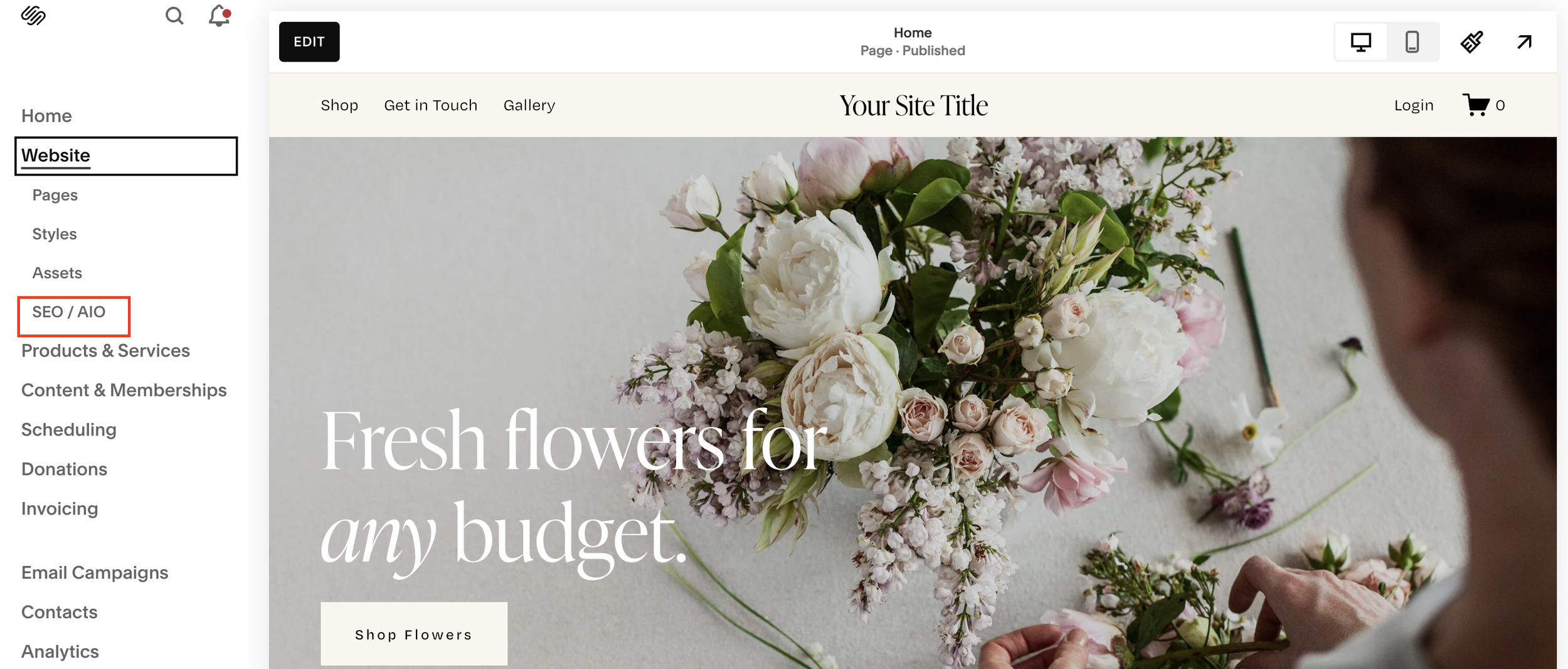
Open your Squarespace site
Navigate to SEO / AIO
Enter the SEO dashboard
You’ll notice a subtle visual highlight at the top of the page, this indicates Beacon AI is available.
How to Optimise SEO with Beacon AI
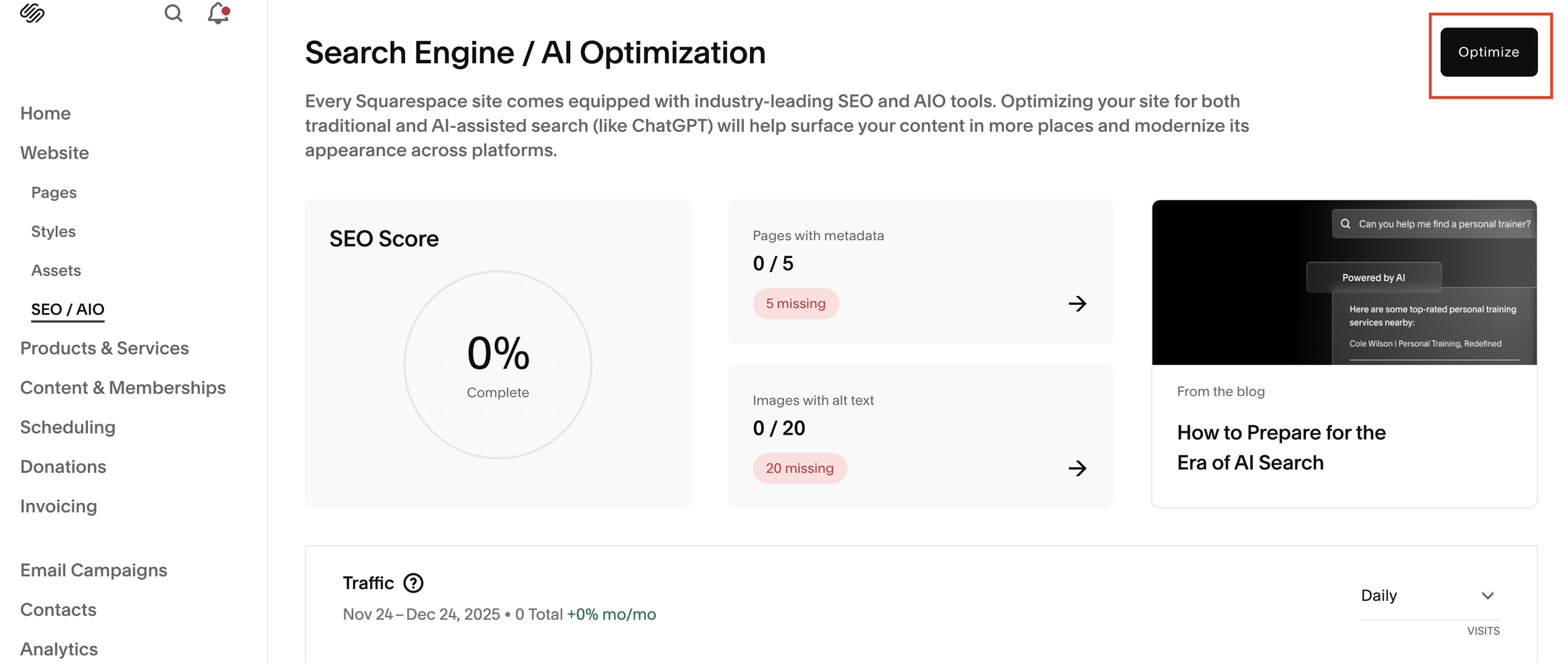
Step 1: Click “Optimize”
Inside the SEO dashboard, click Optimize.
Beacon AI will immediately:
Analyse your site’s content
Review page structure and context
Generate metadata for each page
This process only takes a few seconds and feels impressively polished.
Step 2: Review Auto-Generated Meta Descriptions
Beacon AI creates meta descriptions for every page on your site based on its understanding of your content.
If something doesn’t look right:
Click Regenerate to get an alternative version
Or manually override the text for better SEO accuracy
This manual override option is important, it lets you refine AI output instead of blindly accepting it.
Step 3: Move Through Pages Using “Next”
Once you’re happy with the first page, click Next to review additional pages.
Each page receives:
A unique meta description
SEO-focused phrasing
Context-aware language
While Beacon AI often does a solid job, it’s always worth double-checking for clarity, tone, and keyword relevance.
Image SEO and Alt Text with Beacon AI
Beacon AI also generates image alt text, which is essential for:
Accessibility
Image search rankings
Overall SEO health
In many cases, the descriptions are accurate (for example, identifying people, objects, and environments correctly). However, AI image descriptions can sometimes produce nonsense, especially with abstract or minimal visuals.
Best practice:
Always review image alt text and tweak it to include:
Relevant keywords
Clear, descriptive language
SEO intent (where appropriate)
SEO Score and Performance Improvements
Once you click Save, Squarespace generates an updated SEO score.
Before using Beacon AI, many sites sit at extremely low SEO scores, sometimes as low as 5–10%, due to missing metadata and alt text.
After optimisation, Squarespace shows:
How many pages now have metadata
How many images include alt text
Remaining SEO issues
A checklist for further improvement
This makes Beacon AI especially useful for quick SEO wins.
Beacon AI and the Future of AI Search
Squarespace is positioning Beacon AI as part of its strategy to help websites prepare for AI-powered search engines.
While the educational content and checklists aren’t truly AI-driven, they provide useful guidance for:
Structured content
Better metadata
Improved discoverability in AI search results
Is Squarespace Beacon AI Worth Using?
Beacon AI isn’t perfect, but it’s a strong step in the right direction.
Pros:
Saves time on metadata creation
Improves SEO scores quickly
Built directly into Squarespace
Easy to override and edit
Cons:
Occasionally inaccurate image descriptions
Generic phrasing without manual refinement
Still limited in scope
The best approach is to use Beacon AI alongside your own judgement, not as a full replacement for SEO strategy.
Final Thoughts
Squarespace Beacon AI makes SEO more accessible than ever, especially for beginners or busy site owners. While it won’t replace expert SEO work, it’s an excellent tool for:
Filling SEO gaps
Improving metadata coverage
Boosting your site’s overall SEO health
Used thoughtfully, Beacon AI can significantly improve your Squarespace site’s visibility in both traditional and AI-driven search.